Showing posts with label educational music tools. Show all posts

Monday, August 15, 2011

A List of some of the best Music websites + download, listen, search and share songs for free

Today i am introducing to you a set of the best music sharing web tools. All these tools are free and easy to use. They can allow you to listen and share music with your friends through a real time listening. Educators can use these tools to educationally share and study songs with their students as well.

Here is the list of the music tools:

1 – Wavelenght

wavelength


Wavelenght is a great web application that allows its users “to play songs, watch videos and chat live”. It does not require any sign up and it is very easy to use. With this tool you can listen to the same song together with online friends and create playlists and edit songs as you like.

2 – Tubemystuff

This app is different than the others in the sense that it allows its users to store music on PC and listen to it on iPhone / iPad.

3- ListeningRoom

ListeningRoom as its name implies is a web application that allows its users to share music in real time.

4 – Tape.tv


tapetv


Tape.tv is a great music channel that features high quality music videos from  your favorite artists. It lets its users to search for similar music using criteria such as genbre and artist name.

5 –  Outloud

Outloud is a great web tool that allows its users to share music in real time. There are many tools that let you share music with your friends and colleagues either using emails or other social sharing buttons , but with Outloud you can add the ‘ real time’ features to your sharing

6 –  Songza

Songza is a great musical web2.0 site .It allows you to search and listen to any song or brand you like . It is a collection of radio stations that ordinary users like you and me together with some experts from songza site have created

7 – Listen Music


listentomusic

Listen Music is a music site that lets you search, find and listen to music online without having to download any software. It does requie a sign up to create your free account where you can organize songs into playlists.


8 – Mugasha

mugasha

Mugasha is a cool online application that lets its users listen to music sets online.. It displays music songs from DJs alla round the world.

9 – FlavorTunes


flavor

FlavorTunes is a little bit different in that it allows its users to send interactive invitation to their guests which provides them options to select their favorite songs for the party. so if you are planning to organize a party then FlavorTunes is your solution.

10-  Soundsleeping


soundsleepind

Soundsleeping is a great music website. It offers relaxing and nature sounds that can help in reducing stress levels and make you sleep easily. It also allows its users to mix tracks such as bonfire, creek, bird song, rain, ocean… etc with drums, flute or vibe.

11 -  Puniz


przi

Puniz offers over  500 million audio tracks all of which are legal to download. Most of these songs are availabe on youtube and are in the form of a video. You can listen to the song on the website or download it as FLV, MP4 or 3GP which are ideal formats to be used on portable devices.

12 Soundzit


soundzit

Soundzit is another great music site that lets its users search, listen and embed music online. It is consedered as the audio version of Youtube and claims to list over 300 millio

Friday, August 5, 2011

Tubemystuff – Listen to music from iPhone using your computer

It is all about music today. This is the fourth post about a musical tool i am introducing to you. This app is different than the others in the sense that it allows its users to store music on PC and listen to it on iPhone / iPad.

iPhone and iPda users always complain about storage capacity on their mobile devices. They have only a limited space which can not take in all the songs and videos they want to upload. With Tubemystuff, storage capacity is no more an issue.


image


What is great about this app is that you can store music on different computers and synchronize songs on your computer to your iPhone and iPad.

Some features of Tubemystuff

Here is a list of the main features that Tubemystuff offers to its users:

  • It is free
  • It is easy to use
  • It has an intuitive interface
  • It allows users to store music on their pc and listen to it on iPhone/iPad
  • Sync songs on your pc to your iPhone
  • Listen to songs even when your computer is offline

How can i get started using Tubemystuff ?

Just head over to Tubemystuff main page and download a little application from there. You need then to specify the folders containing music on each computer. Tubemystuff will sync all of these so that you can listen to music even when the pc is offline.


”You can also create a playlist that you can listen to from your iPhone or iPod. No need to move songs from multiple computers to your iPhone, just sync them with TubeMyStuff.”

Check out Free Music Tools to learn more about other similar tools.

ListeningRoom – Enjoy music with your friends in real time

ListeningRoom as its name implies is a web application that allows its users to share music in real time. It resembles Outloud , the other music tool that i have covered in an earlier post. They both let you create virtual rooms where you can upload and listen to hits in real time.


image


Some features of ListeningRoom

Here is a set of the main features that ListeningRoom offers to its users:

  • It is free
  • It is easy to use
  • It has intuitive interface
  • It lets you listen to the same music with friends in real time
  • You can also remove and mute tracks.

How can i get started using ListeningRoom ?

It works in the same way as Outloud. Just head over to ListeningRoom main page and register for a new account. Create a room  and add audio tracks from your computer and invite friends. Here is an excerpt of what ListeningRoom all about:

“Listening Room is a website for listening to music with your friends. You create a room, invite some friends, and then listen to music together. Anyone in a room can upload songs from their computer, and everyone hears the same thing at the same time.

For best results, use the latest version of Chrome, Safari, Firefox, Opera, or Internet Explorer.”

Outloud – Listen to music with your friends in real time

Outloud is a great web tool that allows its users to share music in real time. There are many tools that let you share music with your friends and colleagues either using emails or other social sharing buttons , but with Outloud you can add the ‘ real time’ features to your sharing meaning that your friends  will be able to listen to the same  hits you are listening to.


image


Some features of Outloud

Here is a list of the main features that Outloud offers to its users:

  • It is free
  • It is easy to use
  • It has intuitive interface
  • It lets you share music in real time
  • It lets you chat with your friends while listening to music
  • It also lets you chat with friends while listening to the same music
  • It allows you to organize music in queues and playlists
  • It does not require any registration or sign up you just sign in with your Twitter or Facebook account.


How can i get started using Outloud ?

It is very easy to use,  just head over to Outloud and sign in with your Twitter and Facebook. Create a temporary room for your session and after that you will get a URL that you can share with your friends.  Just drag and drop your music files.

If you want to learn more about other music tools then i invite you to check: Free Music tools

Tuesday, August 2, 2011

TunesIQ – a funny song guessing game

TunesIQ is a song-guessing game. It allows its users to guess the song being played. The game involves audio being played with song options to choose from on the right. This is a great tool for music fans , they can now test their musical knowledge . It is also a fun tool for students . You use it with them create a competitive atmosphere in the classroom where each group tries to beat the other by guessing correctly more and more songs. This is the principal behind this game, the more correct guesses you make the better you score.


tunesIQ


TunesIQ lest you create a free account on their site and start designing your own quizzes. You can make as many quizzes as you want. You can even share these quizzes with friends and colleagues. Just add songs and the tunes for these songs all come from YouTube.


TunesIQ


Some features of TunesIQ

Here is a set of the main features that TunesIQ offers to its users:

  • It is free
  • It is easy to use
  • It has intuitive interface
  • It allows its users to play song-guessing game
  • You can create your own quizzes and share them with others

If you are a music fan then test your musical knowledge using this fun game. If you want to check other free music tools then i invite you to consult this list called: Free Musical Tools

Monday, August 1, 2011

Four free apps to find lyrics on your iPad and iPhone

Here is a list of some of the best ways to find song  lyrics for your iPad. With these tools you can read and enjoy the lyrics of your favorite songs. Educators can also use this list to find lyrics of songs they want to teach to their students.

iLyrics


image


iLyrics is a cool mobile app that allows its users to  find lyrics within iOS apps. The only problem you would encouter with this app is that it does not lyrics for some songs.

LyricFind


image


LyricFind is another mobile app that allows its users to find lyrics to millions of tracks  and right from their mobile devices. It offers several services such as; Bookmarking favorite lyrics, viewing artist biographiesand photos and viewing charts of top lyrics and artists. It also lets you  search by artist, song name or the lyrics themselves. It is completely free and is compatible with iPhone, iPod touch, and iPad.

Instant Lyrics


instant lyrics


Instant Lyrics is an app that works for safari and costs  $1.99. It is accurate and delivers better results because It utilizes multiple lyrics search engines in Safari to search for the lyrics you’re looking for.

Instant Lyrics quickly finds the words to any accurately tagged song on your device. No matter how new or old the song may be, Instant Lyrics uses the id3 tag to search the web and find your lyrics in any language you want.


SoundHound


soundhound


SoundHound is indeed my favorite. It is a free app that can find lyrics of songs beng played in real time. It also can identify songs by listening to it play on another device, such as the radio, TV, etc. What is even greater is the possibility it offers to users to search songs using their own voice; They can just sing or hum to it then it instantly comes up with the songs. You also lookp up a sing by typing in the name and the artist. In short , it is a great app by all means .
These are the best apps features in MakeUseof if you have other suggestions then share them with us here.

Friday, July 15, 2011

beat lab – Create your own music and share it

BeatLab is a cool musical application. It allows its users to create musical beats and share them with your friends or colleagues. I know there are many teachers who are really talented and are in bad need to such tools to give vent to their talents. For instance when i want to teach a song i would always take my laptop and video projector and play the the song for students but this is not the case with one of my colleagues who does not need to go through all this hassle. Each time he wants to teach his students a song he would just take his guitar and play it for them by himself. This is just an example of the talents some teachers have and with tools such as BeatLab, they can now do way better with what they excel at .


Some features of BeatLab

Here is a list of the main features that BeatLab offers to its users:
  • It is free

  • It is simple to use

  • It has a user-friendly interface

  • You can share your beats with your friends

  • It Provides a wide range of sound types

  • Lets you upload your own sounds


How can i get started using BeatLab ?

This is how you can use BeatLab
  1. Head over to BeatLab main page

  2. Login with your face book account

  3. Select the sounds you want by hovering your mouse over the boxes

  4. Sounds are played one column at a time, with the columns in sequence

  5. You can use the site’s beat buttons to control the speed of your beats

  6. When you are done save your beats and a unique URL will be created for you to share with your friends to let them hear your beats.


There are also other cool musical web applications that you can use with your students. Check out The Educational Musical Tools.

LyricsNMusic – find lyrics, videos and images for any song easily

LyricsNMusic is a great music website. It allows its users to easily and instantly look for lyrics of different songs. It sometimes happens that we want to share a song with our students but we need the lyrics for this song and you know going to Google will take you some time before you land on what you want. Now with this cool tool you can save your time and get your targeted lyrics instantly.


Some features of LyricsNMusic

Here is a list of the main features that LyricsNMusic offers to its users:
  • It is free

  • It is simple to use

  • It has user-friendly interface

  • It allows you to find lyrics of a song

  • It shows Amazon and iTunes purchase links of songs

  • It also shows YouTube and Wikipedia links of a song.

  • It lists details of a song on a single webpage these details include the song’s lyrics, videos, Wikipedia results, and links from iTunes and Amazon.


Applications of LyricsNMusic in education

I recommend this website to teachers They can now have a free and instant access to list of lyrics with videos , these lyrics can be printed out and shared with students to read while music is playing.

There are also other cool musical web applications that you can use with your students. Check out The Educational Musical Tools.

TunesIQ – a cool song-guessing game for your students

TunesIQ is a a great website. It is basically a song-guessing game that tests your musical knowledge. It is a fun game that can challenge students‘ motivation and interaction. I really prefer to use this game with students in special occasions for example at the end of semesters. What i really like about this web application is that it allows you to make your own quizzes by adding the songs you choose. The tunes for the songs are mainly from YouTube.


TunesIQ involves audio being played with song options to choose from on the right hand. The more songs you guess correctly the higher you score.

Some features of LyricsNMusic

here is a list of the main features that LyricsNMusic offers to its users:
  • It is free

  • It is simple to use

  • It allows its users play songs and add their own ones

  • It offers a song-guessing game

  • It lets you create quizzes and share them with friends.

Applications of LyricsNMusic in education

Is there anything better than finding a funny way to create your own quizzes for your students to enjoy working on? LyricsNMusic will allow you to create an educational healthy fun with your students via playing song-guessing. They can compete with each other and compare their scores. I am quite sure they will  love it so much. Go ahead and give it a try.
There are also other cool musical web applications that you can use with your students. Check out The Educational Musical Tools.

Saturday, July 9, 2011

Ujam – Create your own music easily

Ujam is a cool web application. It allows its users to create sound tracks without any need for music skills. Everyone can use it to compose, produce,and publish their own music. You can also share your musical product with your friends and colleagues worldwide.
Ujam is a great alternative and one of  the best solutions to copyright issues when using multimedia in classroom projects. Using Ujam, students can now record their own audio and attach it to their work. I know you are probably thinking that using this tool can be very hard but let me just tell you that you are completely wrong. The tool is very easy and simple to use and there is a video tutorial to show you how to use it and you will see how easy it is.


Some features of Ujam

Here is a list of the main features that Ujam offers to its users:
  • It is free

  • It is easy and simple to use

  • It has a good user interface

  • It allows its users to record their audio and make their own music

  • It helps you alter the sound quality of your voice

  • You can also remix a song to include your recording

  • It lets you adjust the tempo of your song

  • It lets you turn your voice into other sounds

How can i get started using Ujam ?

Here is a short video tutorial to show you how to use this handy web application.

That’s it about Ujam – Create your own music easily.

Tuesday, April 5, 2011

Songza : Listen, search ,and find the music you like

Songza is a great musical web2.0 site .It allows you to search and listen to any song or brand you like . It is a collection of radio stations that ordinary users like you and me together with some experts from songza site have created .These stations cover a wide array of themes, contexts, interests, activities, feelings and eras .Some of the stations they have are "Songs In Apple Commercials," "90s One-Hit Wonders," and "Music of Fashion Week.".
songza

Some features of Songza

there are the features Songza offers to its users :
  • It is completely free
  • It requires a sign up to create a station but you can browse through the stations without registration
  • It lets you search and find music you like
  • It has a nice serch utility based on categories and eras
  • You can make your own station and coolect the music you like
  • Interact with people by leaving feedback in their stations and responding to comments on your wall

How can i get started uisng Songza ?

Head over to Songza main page and sign up there
Now you either “
Create a station by clicking on “ create a station” button
songza create
Or
Find a station
Click on find a station to start looking for stations having the music you like
songzafindstatioon

Applications of Songza in Education

I am not really sure to what extent we should let our students be exposed to song and music site because they are not trustworthy all the time . Anyway , what i would suggest here is that teachers log on and create their stations and gather all the songs that they want to include in their teaching , this concerns language teachers who can have sessions called teaching a song .You can also use it to listen to some music and relax after a long busy day at school .
That’s it about Songza : Listen, search , find the music you like
You misht also like to check out :

Here are all the educative web2.0 tools i have covered so far in this blog .I have organized them into different categories , select the category you want and explore the tools

  1. Presentation/Mapping Tools
  2. Organizing / Collaborative Tools
  3. Google / ResearchTools
  4. Audio/Image/Music Tools
  5. Converting/Writing/Storytelling Tools
  6. Video Tools
  7. Teacher Resources
  8. Best of The Rest

Thursday, February 24, 2011

Batlyrics ; teaching songs in education

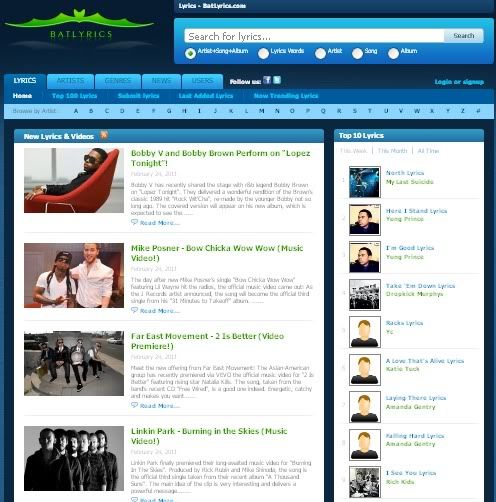
Batlyrics is a wonderful web2.0 tool . It spices up teaching songs in the classroom and gives it another educative dimension . Batlyrics allows its users to search for song lyrics based on specific words or phrases together with its video.

 batlyrics


Some features of Batlyrics

Here are some of the features that characterize Batlyrics :
  • It is very simple and easy to use
  • It is completely free
  • You can use it without having to register
  • It offers several search facilities
  • It uses specific terms to search for lyrics
  • It provides video version to lyrics
  • It lets you participate by submitting your lyrics

How can I get started using Batlyrics ?


First go to Batlyrics main page and if you want to sign up and have your own account then you click on sign up
Now you go to the search bar at the top of the page and tick “ lyrics words” then type in the words you want to see in your lyrics

batlyrics

As you type in you will see the possible phrases from the lyrics popping up

batlyrics

When you pick up your phrase you click on search and you will get a couple of results of lyrics and videos containing your phrases .
For example, I typed in “forever gone” and clicked on search . This is what I would get .

batlyrics


Applications of Batlyrics in education

This is not a filtered site and you should never let students use it unsupervised . Make sure you monitor what students are looking for in their screens . Here are some ideas of how we can integrate Batlyrics in our classrooms :
  • Provide titles to students and let them search for the video and lyrics
  • Use it to find interactive listening materials to your classroom
  • Print the lyrics and use them with your students in activities such as multiple choice or gap filling
That’s it about Batlyrics ; teaching songs in education.

You might also like :