Showing posts with label social networking tools. Show all posts

Tuesday, October 25, 2011

Subjot Read Only What Interests You In Twitter and Facebook

Subjot is a great tool for educators using social networking in their work. I know all of us use at least Facebook and Twitter , others use many more than that.  Can you imagine having to stay updated and read the posts your friends and people you follow post everyday in those social websites you are part of ? You might end up having dozens or even hundreds of posts everyday but only few of them are of some interest to you. To sift through the whole bunch will waste you more and more time you might not even have and you might even probably not care because that is way too much than you can handle. Subjot is the solution, It acts as a filter by letting you read only posts that interest you.  


How can Iget started using Subjot ?

Head over to Subjot main page and log in with either your Twitter or Facebook account. Once logged in then you  can choose the subjects that interest you and that you would like to follow. Now whenever you logged in to your account on Subjot you will only see posts from your friends that relate to your specified topics.
Users will also be able to drop comments and follow other  users they like and view their profiles. They can also write their own thoughts and tag them to a specific subject.
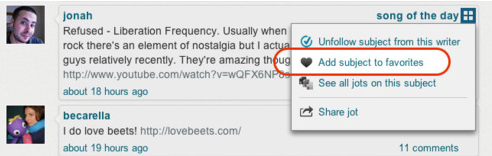


Some features of Subjot 


Here are the main features that Subjot offers to its users:


  • It is free
  • It is easy to use
  • It has a user friendly interface
  • It lets you log in using either your Twitter or Facebook account
  • It allows users to filter posts from their social feeds by focusing only on interested topics
  • It lets you follow people of mutual interest and build your own community
  • It also allows its users to jot down their own thoughts and share them with others in Facebook and Twitter
  • It lets you receive email notifications


I really think that educators need to give Subjot a try and see by themselves. I personally see it as a great tool for personnal and professional development.


Wednesday, August 3, 2011

SideVibe – Simplify the Web and Save Time

SideVibe is a great website for educators. It allows its users to create “ web based online activities, pose questions or even host threaded discussions that can literally float over any Web page.”These activities are stored in the website database so that users can access them anytime they want using the Feedback Tools.


SideVibe is a great site for teachers. They can use it as a source of educational content where students learn in the appropriate context. Contextualization is one of the biggest favors of SideVibe and i think if used properly, it can be a huge incentive for learners to achieve more.

Some features of SideVibe

Here is a list of the main features that SideVibe offers to its users:
  • It has a free basic version with less features than the premium

  • It is easy to use

  • It has an intuitive interface

  • It allows users to create online activities

  • You can create as many vibes as possible

  • You can control who views your vibes

  • Teachers need to sign up for an account and give the entry code to up to 50 students ( free version)

  • You can create as many Courses and Topics  as you like on the Course area of your SideVibe homepage.

  • It lets you printout nice PDF reports


How does Side Vibe work ?

Here are two video tutorials to show you how this tool can be used :
Here is the student companion tutorial
Here are some links to help you learn what Student Companion is all about :
  1. What is the SideVibe Companion?

  2. How do I create a SideVibe?

  3. How do my students access my SideVibes?

  4. Can I create different groups of students?


If you want to learn more about this tool then here are some links to help you do so:
  1. How do I create a SideVibe account for myself?

  2. How do my students create SideVibe accounts?

  3. Is SideVibe secure?

  4. How many SideVibes can I create?

  5. How much does SideVibe cost?

If you want to discover other useful tools that you can use with your students then i invite you to check :

Thursday, June 30, 2011

Big Marker:Free Web Conferencing Tool

Big Marker is a social networking tool. It allows its users to not only create free and unlimited web conferences but also to host them with friends , family, and colleagues. It lets you choose between creating a public room that anyone can access or a private room locked with a password that you can share with your students.


Some features of Big Marker

Here is a list of the main features that Big Marker offers to its users:


  • It is free

  • It is easy to use

  • It has an intuitive interface

  • It allows you to make free online conferences

  • It lest you share your screen , text and audio chat.

  • It lets you conduct live online web meetings using video chat

  • It provides a whiteboard for users to draw lines and shapes on, add text and even capture it as an image file

  • You can share with others your screen be it only a part of it or the whole screen

  • You can either create public rooms or private rooms locked with passwords

  • It provides multi point video conferencing technology that supports multiple participants to interact via video and audio transmissions simultaneously


Applications of Big Marker in education

Big Marker is a great tool for educators , they can use it to conduct online conferences, tutorials, and lessons.You can create private groups for your students and start sharing and even live chatting with them to help them through what they are learning. Students working on collaborative projects can also use it to brainstorm ideas and notes to finalize their works.
If you liked this tool then you can check other free social networking tools.

Sunday, May 22, 2011

Search Team: Collaborate and search the web in small teams

Search Team is a cool website for educators. It allows its users to search in small teams and collaborate to find the best search results. It is a collaborative tool that we can use with our students. Searching the web in such a way has never been this easy.  The purpose is to enhance a sense of collaboration and team work for our students .


Some features of Search Team

Here are the main features that Search Team offers to its users:
  • It is completely free to use

  • It has very simple and easy to use

  • It has such an intuitive interface

  • It requires a sign up but it is quick or you can log in using your face book , LinkedIn account or other services

  • It allows you to search the web more efficiently

  • It lets you save and organize results

  • It allows you to collaborate with your friends or colleagues in real time


How can i get started using Search Team ?

Head over to Search Team main page and sign up for a free account
Now watch these short videos to learn how to use this service.


Applications of Search Team in education

As i said earlier , Search Team is a great collaborative service offered for free. Students can use it when they are working on their search projects, home work assignments, and classroom projects. They can collaborate in real time and refine their searches and avoid duplicate content or references when submitting their papers.
That’s it about Search Team: Collaborate and search the web in small teams.
You might also like:

Tuesday, April 19, 2011

open study; easily create and join online study groups

Open Study is another great social networking website for educators . It is even better than most of the networking tools I have covered here so far . I know exactly how important social media sites are in our digital age and that’s why I am selecting the best tools I can find online and share them with you to generalize the benefit and enhance our teaching practices using web2:0 tools in education . You can check the other social networking sites I have already talked about namely ; Twiducate,Tonnti, and Fridge . Today I will be introducing Open Study and show you how we can use it in our classrooms .
open study

Some features of Open Study

Open Study has many features that sets it apart from other social networking applications ; among these features ;
  • It is completely free
  • It requires a sign up
  • You can use your Facebook account to log in
  • It provides a message board for students in need of help
  • Students can create their own groups
  • They can also join other online groups
  • They can subscribe to their colleagues updates
  • They can use it to jot down their own notes online

How can I get started using Open Study ?

Head over to Open Study main page and sing up for a free account
Watch this tutorial video to learn more how to use Open Study

Applications of Open Study in Education

There are several ways to use Open Study in education ;
students can use it to ;
  1. seek help about  difficult questions from others
  2. they can use it to answer others questions and offer help
  3. it teaches students the notions of team work and collaboration
  4. they can use it to connect with other students studying the same things
  5. they can create their own study groups and invite their teachers to administer it

That’s it about Open Study; easily create and join online study gr

Here are all the educative web2.0 tools i have covered so far in this blog .I have organized them into different categories , select the category you want and explore the tools

  1. Presentation/Mapping Tools
  2. Organizing / Collaborative Tools
  3. Google / ResearchTools
  4. Audio/Image/Music Tools
  5. Converting/Writing/Storytelling Tools
  6. Video Tools
  7. Teacher Resources
  8. Best of The Rest

toonti; build a powerful social community

Toonti is a great social networking site . It lets you create a powerful social community and personalize it easily . Toonti resembles the other social networking tools I have covered here earlier namely ; Tiducate and Fridge . Toonti has a bunch of features that make it one of the useful tools to be tried in education .

Some features of Toonlit

These are the main features that characterize Toonti service ;
  • It is completely free
  • It requires a registration
  • It has a user friendly interface
  • It lets you create your own study groups
  • It lets you share news and photos with others
  • You can manage your clubs and associations
  • You can interact with others via the message board
  • You can also make your groups either private or public

How can I get started using Toonlit ?

Head over to Toonti main page and sign up for a free account
Watch this tutorial video to learn more how to use Toonti

Fridge; Keep your students fresher


Update on 29/01/2012


Fridge has been acquired by google and is closed now here is what google said :
ridge is closing up shop, while the product and team are folded into Google+. We look forward to continuing the vision of creating great fresh and exciting social group experiences for users across the web.


Fridge is another website that allows its users to create their own social networks . It is like Twiducate but with  more options . I am introducing this tool here because of the importance of social networking in education and how beneficial it is to our students if used in the right way . Fridge lets you have access to a set of useful options that facilitate your online interaction with your group members .


Some features of Fridge

Here is  a set of the main features that Fridge offers to its users ;
  • It is free at least until this moment
  • It requires a sign up
  • It has an interactive and simple to use interface
  • It lets you create your own social networks and invite others to join in
  • You can create multiple separate groups using your Fridge account
  • You can share photos , videos, messages and events with friends
  • It lets you organize all your work in one place
  • It allows you to stay in touch with others using the web , email or mobile device
  • It lets you create both private and public groups

How can I get started using Fridge ?

Head over to Fridge main page and sign in for a free account
Watch this tutorial video to learn more how to use Fridge


Applications of Fridge in education

The advantages of Fridge in Education are the same as The ones already mentioned in this very same section for Twiducate ; social Neworks in education . I would recommend that you read this section to learn more how to use this and other social networks in education .
That’s it about Fridge; Keep your students fresher

Here are all the educative web2.0 tools i have covered so far in this blog .I have organized them into different categories , select the category you want and explore the tools

  1. Presentation/Mapping Tools
  2. Organizing / Collaborative Tools
  3. Google / ResearchTools
  4. Audio/Image/Music Tools
  5. Converting/Writing/Storytelling Tools
  6. Video Tools
  7. Teacher Resources
  8. Best of The Rest

Twiducate ;Social Networking in Education

Twiducate is a great website that allows teachers to create personal micro social networks .You can create your account and administer students accounts in such an easy way that students will enjoy it just the way you do . If you are looking for a far wider interaction with your students and know in what pace they are learning then create your own social network and invite your students to join in and start the journey right from there .
twiducate

Some features of Twiducate

Twiducate offers several features to its users among which are ;
  • It is free
  • It has a twitter like format and a user friendly interface
  • It allows you to post discussions , deadlines and homework
  • You can embed your pictures , videos and links
  • You can provide feedback
  • It also lets you connect with students outside the classroom
  • It is very safe and secure .

How can get started using twiducate ?

Head over to Twiducate main page and sign up for a free account
Watch this tutorial video to learn how to use Twiducate

Applications of Twiducate in Education

There are several ways we can use Twiducate in education . We can for instance use it to ;
  1. Create classroom networks reserved  just for your students
  2. Post homework and assignments for your students
  3. Post feedback and direct messages to your students
  4. Stay in touch with your students parents
  5. Students can engage in an interactively educative  messaging with each other
  6. Teachers can share their ideas , tutorials , readings and many more with their students
That’s it about Twiducate ;Social Networking in Education

Here are all the educative web2.0 tools i have covered so far in this blog .I have organized them into different categories , select the category you want and explore the tools

  1. Presentation/Mapping Tools
  2. Organizing / Collaborative Tools
  3. Google / ResearchTools
  4. Audio/Image/Music Tools
  5. Converting/Writing/Storytelling Tools
  6. Video Tools
  7. Teacher Resources
  8. Best of The Rest