Showing posts with label educational technology. Show all posts

Wednesday, May 4, 2011

Today in History : Keep track of the major historical events

Do you want to know the major history events that happened on this same day then Today in History is there for you . This cool website is a great resource for teachers and not only history teachers but all the interested teachers who care about professional development ( i hope you do care about it because it is very important to keep you going ) .


How does Today in History works ?

Today in History  features on its main page the important historical events on each day . The page turns over to the current day and date to give you a hint to what happened today in the past . The leading story is featured with multimedia frills .
On the left hand column there is a smart categorization of the significant events of this day in history . Browse through the different topics to peek at the events you are interested in . Not only that , you can also have This day in history delivered right into your inbox .
You can also use the calendar to jump back and forth in time to view events you might have missed before . The site also features TV Shows, games, and videos .
Head over to Today in History and discover more .
This is the leading  story of may 4


Applications of Today in History in education

Today in History is a very important site that teachers should be aware of . It goes without saying that the primary teachers concerned here are the history teachers but as i said above we can all have recourse to it . We can use it to keep track of the major today in history events and share them with our students .
That’s it about Today in History : Keep track of the major historical events .
You might also like :

Sunday, May 1, 2011

Storify : Create Compelling stories out of Social Media

Storify is a great web2.0 tool . It is an application that allows  users to create engaging stories out of tweets . You can also  create stories using social media and turn what people post on social media into compelling stories .


Some features of Storify

Storify offers a bunch of free features to its users :
  • It is completely free

  • It requires a sing up but you can use your twitter account to access it

  • You can form , narrate , describe and tell stories

  • You can  find and piece together publicly available content from Twitter, Flickr,Facebook, YouTube and other sites

  • can also add text and embed the resulting collages of content on their own sites

Here is a great article about Storify featured in New York Times under the title : Filtering the Social Web to Present News Items .

How can i get started using Storify ?

Head over to storify main page and sign up for a free account or use your twitter account .
Watch this tutorial video to learn more


Applications of Storify in education

We can use Storify in education to create stories out of the tweets and articles we find online and then present them to students in interactive forms . I really like the concept on which Storify is built and i am quite sure that if you try you would love it too .
That’s it about Storify : Create Compelling stories out of Social Media .
You might also like :

Thursday, April 28, 2011

Ta-dalist : The Web’s Easiest To do list Tool .

Ta-dalist is a simple tool that lets you create to do lists for yourself and even for others . This tool is very simple to use and completely free . I want to include it here because i know educators might need it in their daily work . You do not need to keep your lists in sticky notes to hang on the door of your fridge or use paid applications online . Ta-dalist offers you all the option you need to keep your to do lists neat and accessible everywhere with internet connection.


How can i get started using Ta-dalist ?

Log on to Ta-dalist main page and sign up for a free account . Registration takes only a minute after which you will have your own unique URL where you can see all the lists you create .
  1. Click on Sign up for free account

  2. Once signed in click on create a new list

  3. Give your list a name

  4. Add items you want to do

  5. You can email a list of these to do things to yourself

  6. You can also be notified of changes to this list via RSS

  7. Click on edit to change your lists or customize them

That’s it about Ta-dalist : The Web’s Easiest To do list Tool .
You might also like :

Sticky Screen : Set to do list items in your homepage

Sticky Screen is one of the easiest online to do list tool . It is my favorite tool of them all . Sticky Screen is very easy to use . What sets this application apart from all the other to do lists management apps i have covered here is that you can set it as your homepage and whenever you opened a new tab in your browser , your to do list items will just pop up at your face . No way that you  can ignore or forget about them . This is really perfect for us in education . We can use it to remind of us of tasks we need to do or assignments and homework we want to deliver to our students or set it as a reminder of meetings we will have or simply gather all of these items in one page . I am using it as my home page and honestly speaking , hasn’t it been for this tool many tasks will have been waiting there forever . I have loads and loads of things to do and i just keep forgetting about some of them because of stress of work but now i have to face it , things stare at me telling me hey you have stored us here so get us out of this page please .

How can i get started using Sticky Screen ?

Sticky Screen is free of charge and does not require any sign up .
Head over to Sticky Screen Main page and start typing your notes . The notes are updated automatically as you type .
Here is a screenshot of how Sticky Screen looks like


If you liked this post , why not tweet or facebook it with your colleagues , they might be in need of it as well .
That’s it about Sticky Screen : Set to do list items in your homepage .
You might also like :

Todoist and Wedoist : Individual and group task management tools

Todoist and wedoist are  twin websites that do the same job . Todoist is a task management for individuals and Wedoist is for groups . Both of the tools are easy to use and require only a 20 seconds registration . I have already covered another tool called Ta-dalist which is also dead simple to use to create to do lists but these twin services i am talking about to day are much more flexible and have more options than Tada-list .

Some features of todoist and Wedoist

Here are the main features that Todoist and Wedoist offers to its users :
  • The service is completely free

  • It allows you to create to do lists and save them online

  • The service is very secure and has a solid back up system

  • It has a powerful and intuitive interface

  • It has built-in calendar with recurring dates

  • It lets you create sub projects and sub tasks

  • It integrates reminders , GMAIL , Outlook , widgest , API

  • It supports mobile access and provides browser plugins

How can i get started using the service ?

Head over to Todoist main page
Click on sign up and follow the instructions
If you are interested in Wedoist then click on its button on the right hand side and do the same
Watch this tutorial video to learn more


Here is a screenshot of what Wedoist page looks like


Applications of Todist and Wedoist in education

Both of these tools are very important in education . Students and teachers can use them to create and organize their to do lists online . You can use Wedoist list to assemble all the tasks and assignments students have to do during a whole course or for a particular span of time .Go ahead and try them they are great .
That’s it about Todist and Wedoist : Individual and group task management tools.
You might also like :

Wednesday, April 27, 2011

Kiwik Surveys : Create and track your surveys

Kiwik Surveys is a survey builder tool . It is one of the best survey applications online . Most of its users are educators so if you have not heard about it yet then this is your chance to learn more about how to make surveys to include in your classroom with your students for free . You do not need to be a tech geek to use it . It is very simple .


Some features of Kiwik Surveys

Here are the main features that Kiwik Surveys offers to its users :
  • It is free of charge

  • It requires a sign up

  • It has a user friendly interface

  • It has 11 questions types

  • It supports all languages

  • You can customize your background as you wish

  • You can change the survey theme

  • You can send your survey using email lists which you  have imported elsewhere

  • You can track responses to your surveys

  • It has 7 different types of survey links and popups

  • You can create a link to share your survey results with others

  • You can copy , edit or delete surveys


How can i get started using Kiwik Surveys ?

Head over to Kiwik Surveys main page and sign up for a free account
  1. Once logged in click on “start here “

  2. Give your survey a title

  3. Give it a description

  4. Select a style

  5. use the tools bar to do more

Applications of Kiwik Surveys in education
Kiwik Surveys is a good tool for educators . Teachers can use it to create surveys about teaching practices , study units , and many more and administer them to students to work on . The results can be shared with the whole class or even with the students parents .
That’s it about Kiwik Surveys : Create and track your surveys.
You might also like :

How to Learn The Basic Spelling Rules of English.

Today i am sharing with you a video about the basic spelling rules of English and in just two minutes . Being a teacher of English for several years and having been studying English for more than 15 years now , i would really recommend this video to those of you who are still having problems with spelling and are looking for a quicker way to get over it .I know in a digital age such as ours where the info is accessible everywhere online, accuracy and time management are the key notions of success and because the 21st century learners opt for electronic learning much more than they do for hard cover version then this video is ideal for those who do not have time to go over a grammar book just to forget what they have learnt in the first place.
The video has been created with a professionalism touch and covers most of the rules you need to know about English spelling .
Enjoy the video and don't forget to share it with your students , friends and colleagues .

That’s it about How to Learn The Basic Spelling Rules of English.
You might also like:

Monday, April 25, 2011

gymnasium for brain: improve students thinking skills

Gymnasium for Brain is a cool website . I think the title says it all . This website is about puzzles. It provides some very challenging brain games for kids . The purpose is to sharpen students minds and improve their ability to think outside the box. Gymnasium for Brain provides intelligent puzzles together with their solutions , patterns , Speed Math and kid’s corner ;all of which are dedicated to the wellness of the mind . I would really recommend this site for educators dealing with kids .


Some features of Gymnasium for Brain

Here are the main features that Gymnasium for Brain offers to its users :
  • It is free
  • It is simple to use
  • No sign up or registration is required
  • It offers puzzles with step by step solution
  • It provides patterns to sharpen students creative skills
  • It offers speed math to improve thinking speed and make math fun
  • It also features kid’s corner where you can find activities , moral stories and answers to frequently asked questions by kids


Applications of Gymnasium for Brain in education

Gymnasium for Brain is a great site for educators .You can introduce it to your students and work on puzzles with them . Divide students into groups and let them select a name for their group then you start the competition . Give them a puzzle and assign some time for them to think about the solution before you do a whole class correction .Gymnasium for Brain will definitely help students improve their thinking abilities ,sharpen their minds, and develop their analytical and logical skills .
If you liked the post ( i hope you did ) then visit Gymnasium for Brain and discover more .
That's it about Gymnasium for Brain : Improve Students Thinking Skills .
You might also like :

Saturday, April 23, 2011

Topmarks ; Free Educational resources

Topmarks is a great resource site for educators . It features the best educational resources online . It looks like Discovery education with some slight differences in the layout .Topmarks is a UK site where you can browse for educative materials , activities and many more . You can  navigate the site by selecting your subject and age group or use their own search bar . The information is organized in such a way to allow teachers and students to easily find what they are looking for .
Topmarks is one of the sites that educators need to be using in their professional development journey . They can look for ready made materials to include in their classrooms .

The major tabs in Topmarks

when you head over to Topmarks main page you can navigate ;
the classroom tab
topmarksclassroom
this is where you can find excellent resources for interactive whiteboards

Games
topmarksgames
this is where you can find excellent educative games for your students
Parents
topmarksparents
here you can read articles designed specifically for parents
Visit Topmarks to learn more about what it offers to educators .
That’s it about Topmarks ; Free Educational resources.

You might also like ;

A to Z Teacher Stuff ; Improve your teaching practices

A to Z Teacher Stuff is a great website designed specifically for teachers . It offers several services to educators some are free and others are paid for  . The purpose is to help teachers find online resources more quickly and easily .
a to z teacher stuff1

Some services A to Z Teacher Stuff offers to its users

Here is all the features that A to Z Teacher Stuff offers to its users ;
  • Lesson plans
  • Themes
  • Teacher Tools
  • Teacher Store Instant Downloads
  • More sites
  • Printables and Worksheets
  • Articles
  • Discount Teaching Supplies
a to z teacher stuff
I hope you liked A to Z Teacher Stuff and that you would give it a shot . The site is very important when it comes to Teachers professional development and when looking for materials to include in your lessons .
That’s it about A to Z Teacher Stuff ; Improve your teaching practices .
You might also like ;


  • teachers tv : free and Great resources for educators


  • SchoolWAX TV : Free Educative Videos


  • Eduplace : free graphic organizers for educators


  • Holt : teachers' best graphic resource website


  • Neok12 : a resourceful tool for teachers


  • Discovery Education : A Great Website For Educator...


  • Classzone : Free Educative Resources at your hand


  • Edutube in Education


  • edudemic a great online community for educators


  • Snag learning : the best educative documentaries f...


  • WatchKnow : High Quality Educative Resources at Yo...


  • educational videos: enrich your classroom teaching...


  • KidsTube : free educative video resources for your students...
  • Sunday, April 17, 2011

    takingitglobal ; social learning and individual awareness

    TakingItGlobal  is a community based website that was founded in 1999 with the aim off facilitating global awareness , social networking , and civic engagement for the youth through the use collaborative projects .TIG has a great  program LINK called TIGed program that serves over 2,400 schools in 118 countries with professional development, engaging lesson plans, and collaborative global projects.
    tig
    Using TIG you can be able to browse through several global issues organized under different tabs like ;
    tig2
    there is also a special section just for educators where they can ;
    • participate in a community of global educators
    • access online resources and learning activities
    • create a safe , interactive and virtual classroom

    The following is an excerpts of TIG “Impact Stories” ;
    "TIG is one of the most unique and vibrant youth communities today. A place of brilliant people, ambitious visions, and an action-oriented outlook, it is a catalyst and support for young people around the world who aspire to make positive changes in their communities. It has been the source of countless practical projects ranging from action on hunger in a rural community to engagement at the highest levels of the multilateral system. As young people seek opportunities to engage and contribute, TIG will continue to be a place to find the networks, knowledge, and inspiration that will make their efforts succeed."
    Watch this video to learn more about TakingItGlobal
    Do you want to make an impact and inspire people to take action and make a difference in their education using social networking technologies ? You need then to consider visiting TakingItGlobal and sign up for a free account .
    That’s it about TakingItGlobal ; Social Learning and Individual Awareness .

    Here are all the educative web2.0 tools i have covered so far in this blog .I have organized them into different categories , select the category you want and explore the tools

    1. Presentation/Mapping Tools
    2. Organizing / Collaborative Tools
    3. Google / ResearchTools
    4. Audio/Image/Music Tools
    5. Converting/Writing/Storytelling Tools
    6. Video Tools
    7. Teacher Resources
    8. Best of The Rest

    Friday, March 18, 2011

    Criteria and tools to evaluate educative sites

    Talking about the integration of web2.0 tools and applications in education does by default implies the rudimentary knowledge, from  teachers part , of the basic standards on which we make judgments of the usability , practicality and authenticity of websites we will be using with our students . This is really a serious issue for educators in the 21st century classroom . Everyone of us is trying in a way or another and in a differing degrees to use some kind of technology with students .but have you ever asked yourself questions like :
    Do websites i am using with my students respect the educative standards ?
    Do they really contain reliable , authentic and appropriate content ?
    Do their authors have some credibility and credentials in their domains ?

    evaluate

    If you have already asked yourself these questions then you are in the right path but if you still haven't then here is your opportunity to learn how to evaluate websites you want to use in your classroom.
    I have collected the best documents and guides on how to evaluate websites for classroom use from different well-known and prestigious universities . I have already read those articles several times and have twitted them more then 10 times and now i am sharing them with you here .
    To read the article click on the links below :

    Evaluating Web Sites: Criteria and Tools


    If you want to read specific parts of it then i refer you to the headlines .
    Evaluating Information Found on the Internet ( Johns Hopkins University )

    Distinguishing Scholarly Journals from Other Periodicals ( Cornel University )

    Critically Analyzing Information Sources ( Cornel University )

    Evaluating Web Pages: Techniques to Apply & Questions to Ask ( University of California )
    Five criteria for evaluating Web pages ( Cornel University Library )

    I hope you enjoyed the articles and that you have added some new and extra information to your evolving technological repertoire . Until we meet again in another post about a web2.0 tool revision , here are my best wishes for you .

    You might also like :

  • 21st century search engines teachers need to be aware of


  • Bubblesnaps in education


  • Evernote :a new way to get organized in education


  • Springpad : teachers' free notes organizer web2.0 tool


  • A great functionality to improve twitter in education


  • Alphabetizer : organize students' writings


  • Web2.0 the machine is using us


  • The 21st century skills teachers should have


  • The 21st century pedagogy teachers should have


  • EmbedPlus :The educative way to use Youtube videos


  • Evernote :a new way to get organized in education


  • Springpad : teachers' free notes organizer web2.0 tool


  • A great functionality to improve twitter in education


  • Alphabetizer : organize students' writings


  • Web2.0 the machine is using us


  • The 21st century skills teachers should have
  • Tuesday, March 15, 2011

    WatchKnow : High Quality Educative Resources at Your Hand

    WatchKow is an online directory of hundreds of thousands of good videos currently available on the internet . It has more than 20,000 approved educative videos organized into a directory of over 3000 categories . WatchKnow works in the same way wikis do . Teachers suggest educative videos for revision and approval before these videos are assigned the appropriate categories for an instant inclusion into the directory .

    Some features of Watchknow :

    The following are some of the interesting features WatchKnow offers to its users :
    • It is completely free,
    • Videos are available without any registration
    • It aggregates the highest quality videos found on the World Wide Web,
    • Videos cover all major educational topics from elementary to secondary schools (or age range 1 – 18),
    • It provides a safe environment for students and its videos are kids safe
    • It provides a good search tool to look for videos
    • WatchKnow works on a plethora of sources such as :

    watchknow sources

    How can i get started using WatchKnow ?

    Just log on to Watchknow main page . Click on any category on the left hand side and a list of videos will show up on the right side . browse through the videos and click on the one you want .
    Watch this video tutorial to learn more

    WatchKnow Video Tutorial

    Applications of WatchKnow in education

    WatchKnow is a very important educative resource for both teachers and students . You can introduce it to your students and show them how to browse through its different categories . You can assign them topics and classroom projects and let them work in groups to look for the relevant videos to support their assignments . I really like WatchKnow for the educative content it provides for kids and i hope you would give it a shot too.
    That’s it about  WatchKnow : High Quality Educative Resources at Your Hand
    You might also like :


  • 21st century search engines teachers need to be aware of


  • Bubblesnaps in education


  • Evernote :a new way to get organized in education


  • Springpad : teachers' free notes organizer web2.0 tool


  • A great functionality to improve twitter in education


  • Alphabetizer : organize students' writings


  • Web2.0 the machine is using us


  • The 21st century skills teachers should have


  • The 21st century pedagogy teachers should have


  • EmbedPlus :The educative way to use Youtube videos


  • Evernote :a new way to get organized in education


  • Springpad : teachers' free notes organizer web2.0 tool


  • A great functionality to improve twitter in education


  • Alphabetizer : organize students' writings


  • Web2.0 the machine is using us


  • The 21st century skills teachers should have
  • Saturday, March 12, 2011

    Two minutes pause for a smile

    Hi my dear visitors . After a busy and jam-packed week I  woke up this morning feeling so exhausted and cranky . I tossed right and left trying to add some extra rest and energy that my Brian badly needs but did not work . Sometimes it happens that you get so uneasy , frustrated and exhausted as if  you have had a very devastating affair while in fact it is just so much work and little recreation . Anyway , being in such a psychological state and having no one to talk to as i am living alone i turned my laptop on as usual and went straight to take my medicine . I have had this medicine for a long time and have even taken it to my students several times . I have gathered some of the best funny videos online and since i love kids , these funny videos are just about them .
    images
    I have watched these two videos over and over and never get bored . Each time i watch them i feel lively and happy again . The best thing in life is a kid’s smile and i would give anything to see it in every day of my life .
    I decided to share these two videos with you and you might even have already seen them , but since you are the closest people to my life i felt like i needed to share with you everything not just my educational technology posts . I am sorry  this post is out of topic but you might be feeling like me today and just looking wholeheartedly for a smile . I hope i can contribute in the creation of this smile on your face this morning .As the proverb states “ All work and no play makes Jack a dull boy “
    Watch this awesome kid laughing i really adore him , he has made me laugh when no one else could .

    This is the second funny video i like so much . I love those cute kids and wish i can just spend a minute with them in real . Harry is 7, Charlie is 4 3/4

    After i have published this post i received a reply from Alicia Robinson who is a leading member in Technology Integration in Education forum sharing with me another link to a great video which i have watched at least ten times in less than four hours . I loved the video and i am sure you would love it too . All thanks go back to Alicia for sharing .
    I hope i succeeded in stealing a smile from you with these videos . Cheer up and be happy .

    Wednesday, March 9, 2011

    Zamzar : the best file converting web2.0 tool in education

    Zamzar is a fantastic web2.0 tool in education . It is all about file conversion . Zamzar helps you transform your songs, videos, images and documents into different formats . It supports conversion between a wide variety of different file formats .


    zamzar


    Some features of Zamzar

    Zamzar some very cool features that you might like such as :

    • It is completely free
    • It does not need any registration
    • it has a user friendly surface
    • It is fast , accurate and virus free
    • It can be used with iphone
    • It handles any type of format with an incredible speed to change it
    • It converts files from URLs
    • You can integrate Zamzar into your browser
    • Download videos online


      How can i get started using Zamzar ?

      Log on to Zamzar main page . As i said earlier you do not need to register to work on this web2.0 website but if you open your account there you will have added advantages like :

      • Inbox to manage files
      • convert bigger files ( 1 GB )
      • No ads
      • Secure conversion

      There are three things you can do once you are in Zamzar home page

      1- Convert file

      To convert a file you can follow the four steps as shown below :

      zamzarstep1

      zamzarstep2

      zamzarstep3

      zamzarstep4


      2- Download videos

      There are four steps to download videos

      zamzarstep5

      the other three steps are the same as the previous steps shown above

      3- Manage Files

      This is a service provided only for signed up members . You can sign to start using it , it is completely free.

      To learn more about this web2.0 website watch the following video tutorial


      Zamzar Tutorial


      Applications of Zamzar in Education

      Zamzar is a very important service that educators should have recourse to from time to time . Introduce it to your students and show them how they can use it . I am quite sure file formats problems they used to have will no longer make an issue .

      Tha’s it about Zamzar : the best file converting web2.0 tool in education

      You might also like :

    • 21st century search engines teachers need to be aware of
    • Bubblesnaps in education
    • Evernote :a new way to get organized in education
    • Springpad : teachers' free notes organizer web2.0 tool
    • A great functionality to improve twitter in education
    • Alphabetizer : organize students' writings
    • Web2.0 the machine is using us
    • The 21st century skills teachers should have
    • The 21st century pedagogy teachers should have
    • EmbedPlus :The educative way to use Youtube videos
    • Evernote :a new way to get organized in education
    • Springpad : teachers' free notes organizer web2.0 tool
    • A great functionality to improve twitter in education
    • Alphabetizer : organize students' writings
    • Web2.0 the machine is using us
    • The 21st century skills teachers should have

    • Friday, March 4, 2011

      edudemic a great online community for educators

      Edudemic is really a great website for educators . It is  “a global community designed to keep educators , administrators, and everyone up to date on what is happening in the world of education and technology . It pulls from more than 100 different online educational resources to inform and connect the world of technology and education “.

      edudemic1

      Edudemic has articles related to education and technology, guides, news, top 10 lists , and tips and tricks . I really enjoy the resources in this site and am sure you will like it too .

      How can i get started using Edudemic ?


      First log on to Edudemic main page . You do not need any registration .
      As you can see there is a tool bar at the top

      edudemic2

      To quickly give you an overview of what this site has to offer you , i will take you through a step by step tutorial using screenshots .
      1- How to
      edudemic0
      2- In The Classroom

      edudemicinclass

      3- Tips and Tricks

      edudemicitips

      4- Top 10 lists

      edudemicitop10list

      5- Ultimate guides

      edudemiciultimut guide

      Some of the advantages of this website is that it allows you to contribute to the knowledge building by adding your own posts . You can also submit your tips and share your expertise with thousands over there .
      You might also like :

      Friday, February 25, 2011

      Edutube in Education

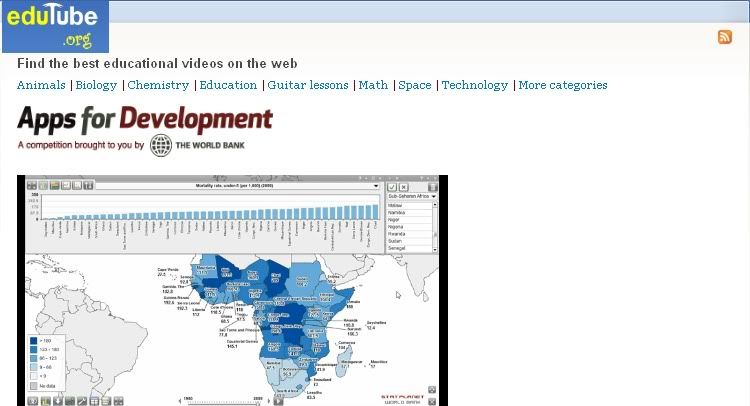
      Edutube is another resourceful site for educators . It has a collection of high quality educational videos. Edutube is mainly an educational video search platform which was launched in April 2008 . The aim behind the creation of this website is “ to organize the best free online educational videos , and make them easy for you to find , watch and download “. Edutube is more or  less similar to SchoolTube in that they both focus on educational videos. If you haven’t heard about SchoolTube yet , then this is your opportunity to learn about it in SchoolTube in Education .

      edutube


      Some features of Edutube

      Edutube has some very interesting features that might help you in your professional development in general . Among these features I can site :
      • It is free, simple to use and easy to navigate
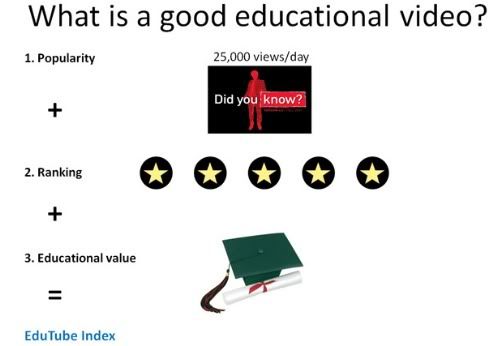
      • It hosts the best educative videos based on criteria such as rank , popularity and educational value

      edutube


      • Videos are searchable according to education- relevant search criteria
      • Edutube is community-based and anyone can contribute and share
      • It has a unique system for organizing and tagging videos
      • Edutube allows you to start your own group on a particular theme and edit your own submissions.
      • You can download your videos and watch them offline

      How can I get started using Edutube ?

      First go to Edutube main page and if you want to be able to upload your videos to edutube and create your own group then you need to sign up . If you just want to look for videos to download you don’t need to register .
      To find a specific video you need to :
      • Use the search box at the top left corner of the Edutube website
      • Use the sitemap in the top menu to find videos based on category , duration , language…..etc
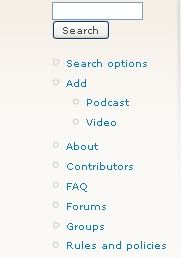
      • Use the advanced search options to narrow down your search and specify your criteria. To do so , click on “ search options” .

      edutube

      To learn more about Edutube read their FAQ page .

      Application of Edutube in Education

      I personally think that edutube is one of the important resource that educators should have recourse to . You can use it to start your own group in which you invite your students and keep them updated with the educative videos you deem important in their learning . You can also use it to enrich your classroom teaching with some educative media to break the classroom monotony and enhance students comprehension .
      Edutube can also be a very important element in your professional development . Join groups of mutual interest and discuss with other educators and benefit from each other’s expertise .
      That’s it about Edutube in Education

      You might alo like :


    • Bubblesnaps in education


    • Evernote :a new way to get organized in education


    • Springpad : teachers' free notes organizer web2.0 tool


    • A great functionality to improve twitter in education


    • Alphabetizer : organize students' writings


    • Web2.0 the machine is using us


    • The 21st century skills teachers should have


    • The 21st century pedagogy teachers should have


    • EmbedPlus :The educative way to use Youtube videos


    • Evernote :a new way to get organized in education


    • Springpad : teachers' free notes organizer web2.0 tool


    • A great functionality to improve twitter in education


    • Alphabetizer : organize students' writings


    • Web2.0 the machine is using us


    • The 21st century skills teachers should have


    • The 21st century pedagogy teachers should have
    • Thursday, February 24, 2011

      The Plagiarism Checker in Education

      This is one of the important web2.0 tools i would highly recommend for educators .The Plagiarism Checker detects the plagiarized text or chunks of a text in your students assignments , essays, articles …ect . The advancement of technology and particularly the mobile one has really improved both our teaching and our students learning . The information has become accessible to whomever . With a single click , students will be able to download a whole ebook into their computers and exchange files and documents with a lightening speed . But I am afraid this technology boom has also brought around some negative sides . Students are more and more dependent on online resources to do their work which endangers their reflective thinking and creativity .
      We , as educators , should always be aware of these side effects and work hard to redress them as much as possible . In this regard , I present to you this web2.0 tool that will help you detect those students who rely on “ copy and paste”

      plagiarism checker


      How do I use The Plagiarism Checker ?


      Just go to The Plagiarism Checker main page . You will find a box there where you can paste the suspected text or paragraph you have copied and click on “ check the paper” button and that’s it .

      Plagiarism checker

      I know many of you will straight give a sigh of relief knowing the importance of this web2.0 tool , we all suffer from plagiarism and it is time to correct some of our students misbehavior .
      That’s it about The Plagiarism Checker in Education .

      Here are all the educative web2.0 tools i have covered so far in this blog .I have organized them into different categories , select the category you want and explore the tools

      1. Presentation/Mapping Tools
      2. Organizing / Collaborative Tools
      3. Google / ResearchTools
      4. Audio/Image/Music Tools
      5. Converting/Writing/Storytelling Tools
      6. Video Tools
      7. Teacher Resources
      8. Best of The Rest

      Friday, February 18, 2011

      advice for all teachers using web2.0 tools in their classrooms

      This is in fact an advice that should have been posted long time ago but I am the kind of person who learns by doing and did not realize its importance until just recently . Be it a teacher , student or whomever you are and since you are here in this educational technology blog whose niche focuses primarily on the application and integration of web2.0 tools in education then I think this advice concerns you as well .
      A quick overview on the posts I have been publishing here  would let you  notice that some of the web2.0 tools entail a valid email address for registration , and this is where the shoe pinches. Submitting your professional or personal email addresses to every website that asks for one can sometimes offset unexpected negative results. Spam is number one
      Two years ago, When I first started exploring the potential of web2.0 tools in education , I used to submit my personal email address to any site that I would be using until I ended up having accounts with quite many websites and forums . Guess what happened ? My inbox used to be overloaded with emails most of which were just spam and junk mail ; sometimes I would get an important email and I would never have a clue till it’s too late simply because the huge amounts of emails which I would receive would take me hours to browse through them . This got on my nerves and pushed me to seriously think about another alternative. This “ electronic chaos “ I have in my inbox .No need to wonder where this spam comes from . unfortunately , Some of the website to which you submit your email address when creating an account with them just dump you and sell out your email to advertising companies which in turn start promoting their products through emails sent to you and many others like you .
      Don’t freak out !! there is a solution to this now . There is what is called temporary inboxes which are free services that allow you to open an account with them instantly and without having to submit any personal information . These services, thus , generate a valid temporary email address that is particularly useful when the email address is only part of the registration process and the site does not rely on the email address for communication .
      Here are two of the main free services that allow users to have free instant valid email addresses.

      1-Tempinbox


      tempinbox

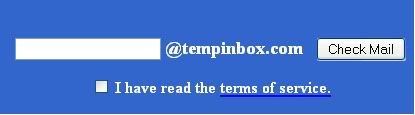
      First go to Tempinbox main page  , scroll down to the blue bar and enter a name and tick “ I have read the terms of service and click on check mail .
      Now you have a valid email address .

      mailinator

      To view messages in the inbox of this email go to this blue bar again and type in the same name you used and click check mail then scroll down to “ view all messages”
      tempinbox

      2- Mailinator


      mailinator

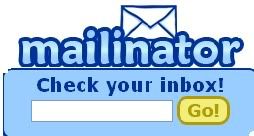
      Go to Mailinator main page and type in a name for your email address in the box as shown below and click on “go”

      mailinator

      An email address will be generated for you . You can also try general alternate email . If you want to learn more about this read : Introducing Alternate Inbox Names
      If you still have any questions about this service visit their FAQ page to learn more .
      That’s it about : Advice for teachers using web2.0 tools in their classrooms
      Do you like this post ? have you read my other posts covering the effective use of web2.0 tools in education ? If you think my posts are worth your time then join my facebook fan page ( look at the righ sidebar to join ) or subscribe to my newsletter to get my posts right into your inbox and at the instant I publish them.

      You might also like :


    • Evernote :a new way to get organized in education


    • Springpad : teachers' free notes organizer web2.0 tool


    • A great functionality to improve twitter in education


    • Alphabetizer : organize students' writings


    • Web2.0 the machine is using us


    • The 21st century skills teachers should have


    • The 21st century pedagogy teachers should have


    • EmbedPlus :The educative way to use Youtube videos
    •