Showing posts with label teaching with technology. Show all posts

Friday, March 18, 2011

Criteria and tools to evaluate educative sites

Talking about the integration of web2.0 tools and applications in education does by default implies the rudimentary knowledge, from  teachers part , of the basic standards on which we make judgments of the usability , practicality and authenticity of websites we will be using with our students . This is really a serious issue for educators in the 21st century classroom . Everyone of us is trying in a way or another and in a differing degrees to use some kind of technology with students .but have you ever asked yourself questions like :
Do websites i am using with my students respect the educative standards ?
Do they really contain reliable , authentic and appropriate content ?
Do their authors have some credibility and credentials in their domains ?

evaluate

If you have already asked yourself these questions then you are in the right path but if you still haven't then here is your opportunity to learn how to evaluate websites you want to use in your classroom.
I have collected the best documents and guides on how to evaluate websites for classroom use from different well-known and prestigious universities . I have already read those articles several times and have twitted them more then 10 times and now i am sharing them with you here .
To read the article click on the links below :

Evaluating Web Sites: Criteria and Tools


If you want to read specific parts of it then i refer you to the headlines .
Evaluating Information Found on the Internet ( Johns Hopkins University )

Distinguishing Scholarly Journals from Other Periodicals ( Cornel University )

Critically Analyzing Information Sources ( Cornel University )

Evaluating Web Pages: Techniques to Apply & Questions to Ask ( University of California )
Five criteria for evaluating Web pages ( Cornel University Library )

I hope you enjoyed the articles and that you have added some new and extra information to your evolving technological repertoire . Until we meet again in another post about a web2.0 tool revision , here are my best wishes for you .

You might also like :

  • 21st century search engines teachers need to be aware of


  • Bubblesnaps in education


  • Evernote :a new way to get organized in education


  • Springpad : teachers' free notes organizer web2.0 tool


  • A great functionality to improve twitter in education


  • Alphabetizer : organize students' writings


  • Web2.0 the machine is using us


  • The 21st century skills teachers should have


  • The 21st century pedagogy teachers should have


  • EmbedPlus :The educative way to use Youtube videos


  • Evernote :a new way to get organized in education


  • Springpad : teachers' free notes organizer web2.0 tool


  • A great functionality to improve twitter in education


  • Alphabetizer : organize students' writings


  • Web2.0 the machine is using us


  • The 21st century skills teachers should have
  • Saturday, March 12, 2011

    Two minutes pause for a smile

    Hi my dear visitors . After a busy and jam-packed week I  woke up this morning feeling so exhausted and cranky . I tossed right and left trying to add some extra rest and energy that my Brian badly needs but did not work . Sometimes it happens that you get so uneasy , frustrated and exhausted as if  you have had a very devastating affair while in fact it is just so much work and little recreation . Anyway , being in such a psychological state and having no one to talk to as i am living alone i turned my laptop on as usual and went straight to take my medicine . I have had this medicine for a long time and have even taken it to my students several times . I have gathered some of the best funny videos online and since i love kids , these funny videos are just about them .
    images
    I have watched these two videos over and over and never get bored . Each time i watch them i feel lively and happy again . The best thing in life is a kid’s smile and i would give anything to see it in every day of my life .
    I decided to share these two videos with you and you might even have already seen them , but since you are the closest people to my life i felt like i needed to share with you everything not just my educational technology posts . I am sorry  this post is out of topic but you might be feeling like me today and just looking wholeheartedly for a smile . I hope i can contribute in the creation of this smile on your face this morning .As the proverb states “ All work and no play makes Jack a dull boy “
    Watch this awesome kid laughing i really adore him , he has made me laugh when no one else could .

    This is the second funny video i like so much . I love those cute kids and wish i can just spend a minute with them in real . Harry is 7, Charlie is 4 3/4

    After i have published this post i received a reply from Alicia Robinson who is a leading member in Technology Integration in Education forum sharing with me another link to a great video which i have watched at least ten times in less than four hours . I loved the video and i am sure you would love it too . All thanks go back to Alicia for sharing .
    I hope i succeeded in stealing a smile from you with these videos . Cheer up and be happy .

    Thursday, February 24, 2011

    The Plagiarism Checker in Education

    This is one of the important web2.0 tools i would highly recommend for educators .The Plagiarism Checker detects the plagiarized text or chunks of a text in your students assignments , essays, articles …ect . The advancement of technology and particularly the mobile one has really improved both our teaching and our students learning . The information has become accessible to whomever . With a single click , students will be able to download a whole ebook into their computers and exchange files and documents with a lightening speed . But I am afraid this technology boom has also brought around some negative sides . Students are more and more dependent on online resources to do their work which endangers their reflective thinking and creativity .
    We , as educators , should always be aware of these side effects and work hard to redress them as much as possible . In this regard , I present to you this web2.0 tool that will help you detect those students who rely on “ copy and paste”

    plagiarism checker


    How do I use The Plagiarism Checker ?


    Just go to The Plagiarism Checker main page . You will find a box there where you can paste the suspected text or paragraph you have copied and click on “ check the paper” button and that’s it .

    Plagiarism checker

    I know many of you will straight give a sigh of relief knowing the importance of this web2.0 tool , we all suffer from plagiarism and it is time to correct some of our students misbehavior .
    That’s it about The Plagiarism Checker in Education .

    Here are all the educative web2.0 tools i have covered so far in this blog .I have organized them into different categories , select the category you want and explore the tools

    1. Presentation/Mapping Tools
    2. Organizing / Collaborative Tools
    3. Google / ResearchTools
    4. Audio/Image/Music Tools
    5. Converting/Writing/Storytelling Tools
    6. Video Tools
    7. Teacher Resources
    8. Best of The Rest

    Friday, February 18, 2011

    advice for all teachers using web2.0 tools in their classrooms

    This is in fact an advice that should have been posted long time ago but I am the kind of person who learns by doing and did not realize its importance until just recently . Be it a teacher , student or whomever you are and since you are here in this educational technology blog whose niche focuses primarily on the application and integration of web2.0 tools in education then I think this advice concerns you as well .
    A quick overview on the posts I have been publishing here  would let you  notice that some of the web2.0 tools entail a valid email address for registration , and this is where the shoe pinches. Submitting your professional or personal email addresses to every website that asks for one can sometimes offset unexpected negative results. Spam is number one
    Two years ago, When I first started exploring the potential of web2.0 tools in education , I used to submit my personal email address to any site that I would be using until I ended up having accounts with quite many websites and forums . Guess what happened ? My inbox used to be overloaded with emails most of which were just spam and junk mail ; sometimes I would get an important email and I would never have a clue till it’s too late simply because the huge amounts of emails which I would receive would take me hours to browse through them . This got on my nerves and pushed me to seriously think about another alternative. This “ electronic chaos “ I have in my inbox .No need to wonder where this spam comes from . unfortunately , Some of the website to which you submit your email address when creating an account with them just dump you and sell out your email to advertising companies which in turn start promoting their products through emails sent to you and many others like you .
    Don’t freak out !! there is a solution to this now . There is what is called temporary inboxes which are free services that allow you to open an account with them instantly and without having to submit any personal information . These services, thus , generate a valid temporary email address that is particularly useful when the email address is only part of the registration process and the site does not rely on the email address for communication .
    Here are two of the main free services that allow users to have free instant valid email addresses.

    1-Tempinbox


    tempinbox

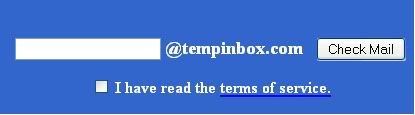
    First go to Tempinbox main page  , scroll down to the blue bar and enter a name and tick “ I have read the terms of service and click on check mail .
    Now you have a valid email address .

    mailinator

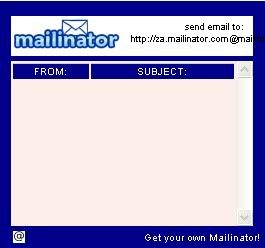
    To view messages in the inbox of this email go to this blue bar again and type in the same name you used and click check mail then scroll down to “ view all messages”
    tempinbox

    2- Mailinator


    mailinator

    Go to Mailinator main page and type in a name for your email address in the box as shown below and click on “go”

    mailinator

    An email address will be generated for you . You can also try general alternate email . If you want to learn more about this read : Introducing Alternate Inbox Names
    If you still have any questions about this service visit their FAQ page to learn more .
    That’s it about : Advice for teachers using web2.0 tools in their classrooms
    Do you like this post ? have you read my other posts covering the effective use of web2.0 tools in education ? If you think my posts are worth your time then join my facebook fan page ( look at the righ sidebar to join ) or subscribe to my newsletter to get my posts right into your inbox and at the instant I publish them.

    You might also like :


  • Evernote :a new way to get organized in education


  • Springpad : teachers' free notes organizer web2.0 tool


  • A great functionality to improve twitter in education


  • Alphabetizer : organize students' writings


  • Web2.0 the machine is using us


  • The 21st century skills teachers should have


  • The 21st century pedagogy teachers should have


  • EmbedPlus :The educative way to use Youtube videos
  • Wednesday, December 22, 2010

    Educational Technology and ICT


    Technology , the century term by excellence , is becoming increasingly crucial in both our professional and personnal lives . It has facilitated our life to the point that we become very much dependent on its use in our daily acitivities . We will not talk about technology in its broadest scope but we will instead narrow it down to a particular field called Educational Technology (ET ) and ICT ( Information Communication Technology ) as it is straightforwardly related to our profession as teachers and educators .
    The question here is ; why educational technology and ICT ? The answer is very simple , our learners and students use technology more and more while a very large portion of teachers are lagging behind . Unfortunately , there are many teachers now that are far less skilled and knowledgeable than their students when it comes to using current technology .This situation is even worse in Africa and the Arab world in general . Being myself part of theis geographical location , I know exactly how needed teachers and educators are to this wealth of technological innovations without which our teaching and professional development have no meaning . This blog , therefore , is a simple and modest try from my part to help in this this gap by providing non technical descriptions of new technological tools and by demonstrating how teachers can use these tools in the classroom . In brief , we will be talking about the practical applications of technology to teaching especially TEFL (Teaching English as a Foreign language ) and TESL (Teaching English as a Second Language ) .
    This work is primarily meant for teachers with little or no experience of ICT tools and how to use them in the classroom and also for those who are already ICT knowledgeable but still lack in some fresh ideas about its effective use as well as links to new development in this field . Please not here that any proprietal software programs and operating systems that will be listed through the whole posts DO NOT mean in any way that we are endorsing these products but are included just for the sake of simplifying and concretising instances of tools that teachers can use in their classrooms .
    Web2.0 in Education
    Finally , we would very much welcome any kind of feedback from you and if you are working now on a certain ICT project or are implementing any other application or tool with your students then share the knowledge here and let others benefit . Our aim is to develop foreign language teaching through technology .

    Wednesday, November 24, 2010

    Using Websites withing The Classroom


    Using websites is one of the easiest and less stressful ways of integrating technology into the classroom. There is a plethora of constantly expanding collection of resources on the web , at a variety of levels and covering an amazing array of topics. You can choose from authentic ( written for internet surfers in general ) sources or ELT specific sites ( made by , and for , teachers ), monolingual sites , sites with multimedia , or just simple text for those on slower connection.
    there are several ways you can use web pages in the classroom :

    1. as printed pages in cases where there is no computers or where there is a limited access to the net. Teachers can just print out a couple of pages containing the targeted items they need to use in the classroom and then zerox it for the rest of the class to have .
    2. with one computer with an internet connection .There are many schools that do not have enough computers to cover all the needs of teachers and students , in this case one can have access only to one computer and with the use of data projector or an interactive whiteboard the visibility can be greater for the whole class and the benefit is generalized.
    3. In a computer lab with a set of networked and interconnected computers . This is the ideal situation any language teacher would aspire for .

    It is very important that teachers should organise regular get-togethers with their learners to explain to them the advantages of learning through technology . It should be clear to all language learners that the use of internet is an intrinsic part of their overall language development process and is not a pass time or an occasional activity that has nothing to do with their study program .
    Talk to your students and explain the reasons for using internet and discuss their attitudes to technology in general .Show them how the coursebook can be enhanced by extra materials from the net .When you are home by your computer trying to assemble a set of authentic ELT sites for a possible incorporation into your teaching , keep in mind that you have to look for sites that :

    1. have easy structure and navigation.
    2. smaller chunks of text by page.
    3. have visual and multimedia materials
    4. approachable and understandable content

    you can also provide for your learners some useful online dictionary sites to help them along their electronic classroom learning.

    9C964J3H6FX8

    Technology in The Classroom


    Technology in language teaching is not new . In fact , the use of technolgy in education dates back to the 1960s and 1970s . Tape recorders , language laboratories and videos were in use in many classrooms in all around the world . Computers were the primary source of materials in the form of visual stimuli to which learners had to respond and carry out different tasks. This method is actually the one that gave birth to the Computer Assisted Language Learning ( CALL ) approach . learners would depend on computer programs to consolidate their knwowledge and develop their basic skills . Tasks such as filling in gapped texts , matching sentences halves , multiple choices , and text reconstruction were probably the most renowned CALL activities in the 1980s . The feedback learners would get from computers used to range from simple true/false answers to a more sophisticated system of response that would even brief the learners about the whys of their mistakes and would provide the necessary remedial work .

    With the rise of internet phenomenon and its widespread easy access , CALL has shifted its focus from depending wholly on computer programs to embracing the use of internet and web-based tools . The term TELL ( Technology Enhanced Language Learning ) appeared in 1990s thanks to the wider possibilities offered by the internet and communication technology .
    Language teachers were, thus, integrated into the ICT on a larger scale and with a differing degrees .Thier old-fashioned ELT ( English Language Teaching ) practices have been replaced by new sophisticated web-based tools and techniques that provides :


    • opportunities for authentic tasks .
    • access to a wealth of ready-made ELT materials .
    • opportunities for collaboration and communication between learners who are geagraphically distanced.
    • Prolific online links and resources for learners to deepen their knowledge and sharpen their skills.
    These techniques have far improved the quality of language teaching and is still helping with the normalisation of technology in language teaching , where the use of technology in teaching would be just as natural as the use of books or pens and papers. Unfortunately , a general lack of ICT training for teachers means that we still have some way to go until this normalisation is completed and the digital divide is bridged . Unless the training bodies seriously address the issue of ICT integration into ELT some teachers will still hold negative attitudes towards technolgy and technophobia will still cloud their vision and hover over their heades just to turn them into digital immigrants who have come late to the world of technology , if at all . In many cases teachers become the digital immigrants and our younger students are the digital natives .


    What does it take for a teacher to use ICT in the classroom ?

    It really doesnt take any sophisticated and technical knowledge of softwares and programming languages much as you dont need to be a mechanic to drive a car . Try to be a technogeek ( a term for a technology enthusiast ) and fight those negative attitudes about computer .Befriend technological tools and see by yourself the benefits of using technology in the classroom.
    Do you know how to use email, a word processing program ( like word) and the internet ? I am quite sure everybody handles that easily .This knowledge is certainly enough to get started with usning trechnology in the classroom . There are also several online platforms and teacher development groups dedicated to exploring and learning about the use of technology in the classroom for teachers to join .You can benefit alot from them , ask for help from other colleagues and read others' experiences with ICT, they are just people like you who have started from scratch and turned their classrooms into a real language laboratories. Don't be afraid you are not alone , there are several teachers out there who are ready to give you a hand .Don't hesitate to google it and you will have access to a plethora of technology-based resources and materials that would tremendously facilitate your teaching and render it enjoyable .Dont forget , it's only the first step that counts.